QueensGames / The playing guide
How to play the Queens game
Place one queen in each row, column and colored region, without letting any two queens touch. In Daily Queens, tap an empty cell once to mark it, twice to place a queen, and once more to clear it.
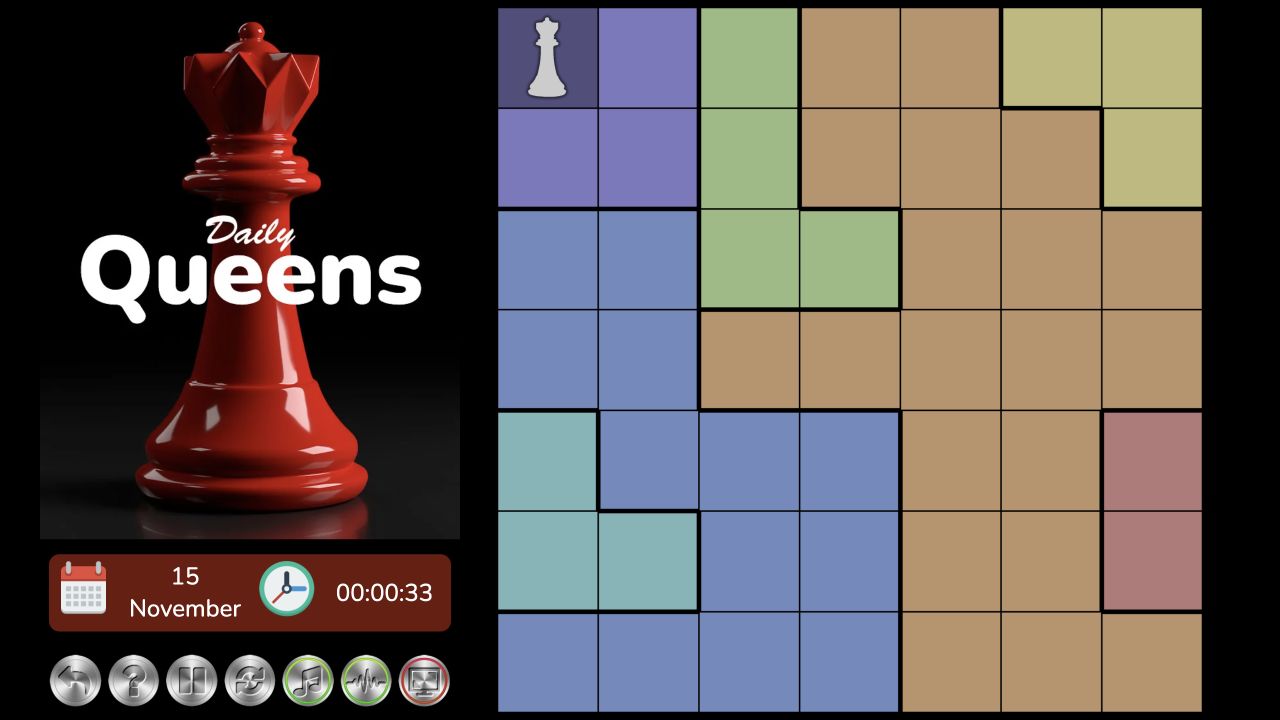
Start a board in your browser
Open the Queens game and press Play Queens. The cover gives way to a loading animation in the same space, then to Daily Queens from HTMLGames. Choose a board size in the game’s opening menu. No QueensGames account or download is required.
The game is independent of LinkedIn’s Queens. Its puzzles, dates and controls belong to the HTMLGames version embedded here. A solution or hint for a different provider’s daily board may not apply, even if both games use the same basic rules.
Choose 7×7, 9×9 or 11×11
All three sizes use the same constraints. What changes is the number of cells to examine and queens to place, not how queens behave.
| Board | Cells to inspect | Queens in a completed board |
|---|---|---|
| 7×7 | 49 | 7 |
| 9×9 | 81 | 9 |
| 11×11 | 121 | 11 |
Start with 7×7 if you are learning the controls: its smaller grid is easier to scan and gives each cell more room on a phone. A larger board contains more squares to track, but size alone does not tell you how hard a particular deduction will be. The date selector inside Daily Queens lets you choose another puzzle date; check the displayed date before comparing a board with someone else.
Tap to mark; tap again to place
In this version, a cell cycles through empty → dot marker → queen → empty. Use a mouse click on desktop or a tap on a touchscreen. A first tap on an empty square adds a dot, so do not mistake it for a placed queen. A second tap places the queen; a third clears the cell.
Use a dot for a square you have ruled out. It is a working note, not a piece that satisfies a row or region. To correct an accidental dot, follow the cycle back to empty and check the visible result. These instructions do not assume the shortcuts, automatic marks or hint behavior offered by other Queens websites.
The Fullscreen control next to the game asks the browser to enlarge the playing area. Support varies by browser and device. You can still play in the page if fullscreen is unavailable; on a small screen, landscape orientation may give the grid more room.
The four Queens game rules
1. Exactly one queen in each row
A row runs across the board from left to right. Once it has a queen, every other cell in that row is unavailable—even cells at the opposite edge or in another color region. An empty row still needs its queen before the board is complete.
2. Exactly one queen in each column
A column runs from top to bottom. Two queens in the same column conflict regardless of the distance between them. For example, moving a second queen several rows away does not fix a shared-column problem; its column must change too.
3. Exactly one queen in each colored region
Follow the whole outlined color region, including any narrow arm that reaches into a different row. That entire shape gets one queen. Two queens can be in different rows and columns and still conflict because they occupy the same region.
Regions are constraints, not decorations. If all but one cell in an unfilled region have been validly excluded, the remaining cell must hold that region’s queen. A region’s physical size is less useful than the number of candidates still available inside it.
4. Queens cannot touch
Two queens may not sit in cells sharing an edge or a corner. The row and column rules already rule out edge-to-edge neighbors; the extra diagonal check rules out corner-to-corner neighbors. It does not extend across an entire chess diagonal. See the diagonal rules and illustrated examples for that distinction.
Make your first deduction
Scan the board before placing anything. Find an unfilled region, row or column with very few remaining choices. Count candidates after applying the constraints, rather than assuming a small region must be solved first.
For a simple invented example, suppose a region has three candidate squares. One shares a column with an already established queen; another touches an established queen at a corner. If those placements and exclusions are sound, only the third square remains for this region’s queen. You have a reason to place it, rather than a guess that happens to fit.
After each proved placement, check its full row, full column, entire region and immediate corner neighbors. Revisit the groups affected by those exclusions. If any unfilled group has no candidate left, stop and inspect the earlier reasoning or marks. For a longer worked exercise, read six beginner mistakes and elimination tips.
Know when the board is complete
A finished board satisfies all four rules at once: one queen in every row, every column and every region, with no touching pair. Having seven queens on a 7×7 board is necessary, but the count alone is not enough. Two queens could still share a region while another region is empty.
Check the groups one at a time instead of relying on a board that merely looks balanced. A dot does not count toward completion, and a square that is currently possible is not automatically the correct location for a queen.
If the game does not load
The game connects to a third-party provider after you press Play or Fullscreen, so it can take longer than the surrounding page. If the loading screen persists, check your connection, try Reload game where shown, or refresh the page and start again. Reloading may interrupt an unfinished puzzle.
If browser restrictions prevent embedded content from loading, review them only if you want to allow that provider. You can leave third-party content blocked and read this guide. The game may show advertisements and use cookies or local storage; see the game provider’s privacy information and our privacy notice.
QueensGames does not offer accounts or cloud-synced progress. Switching browsers or clearing stored data can change what the embedded game remembers. Do not assume an unfinished board will follow you to another device.
Play a Queens board and try one small deduction at a time.
These instructions describe Daily Queens by HTMLGames / Zygomatic. Board sizes and constraints are stated in the official game instructions; the click cycle is checked in the embedded game. This is an independent guide, not a source of LinkedIn’s daily answers.
For the older chess-style puzzle, read the separate classic N-Queens rules and worked example. Its whole-diagonal rule does not apply to Daily Queens.
To replay an earlier date or return to today’s board, use our Daily Queens calendar guide and player.